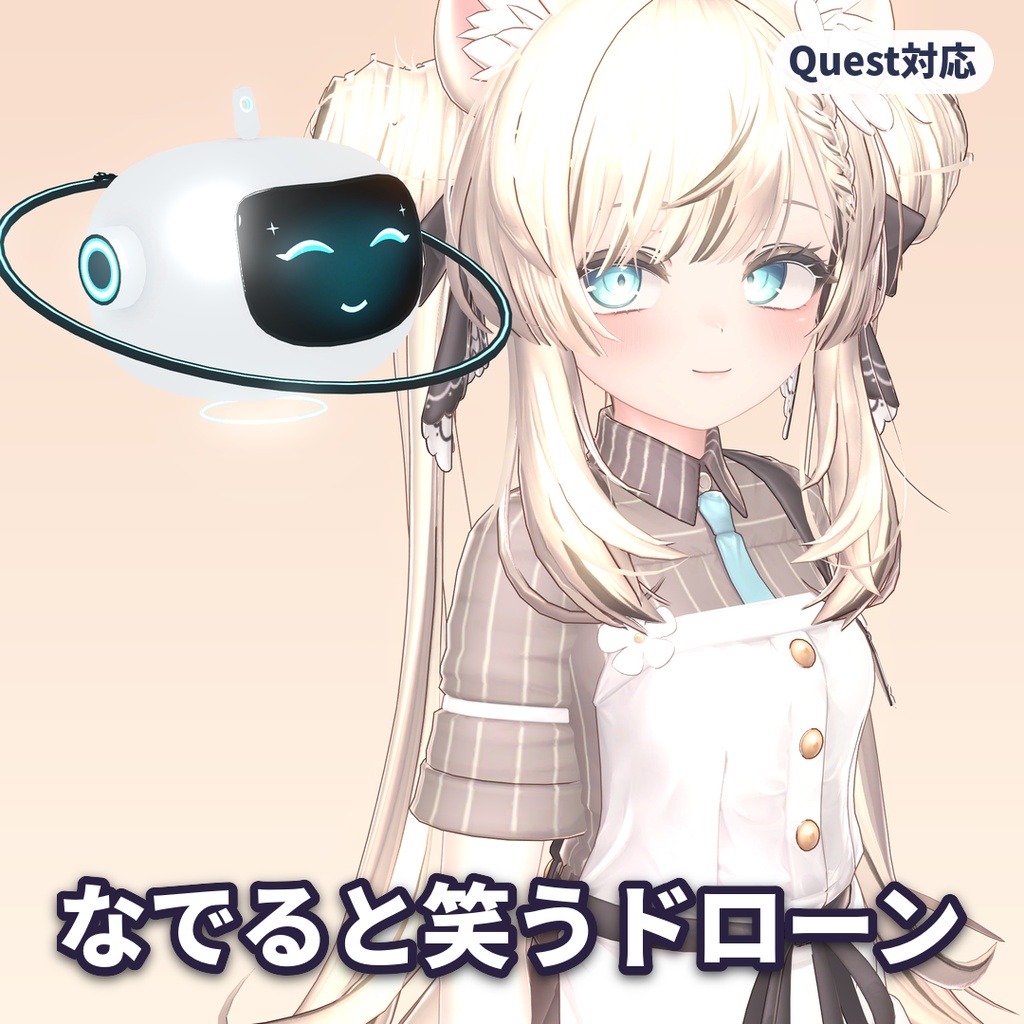
【なでると笑う】表情が変わる追従ドローン MOONLET【VRChat・MA・Quest対応】【v1.1:ランタンモード追加】
- ダウンロード商品¥ 1,500
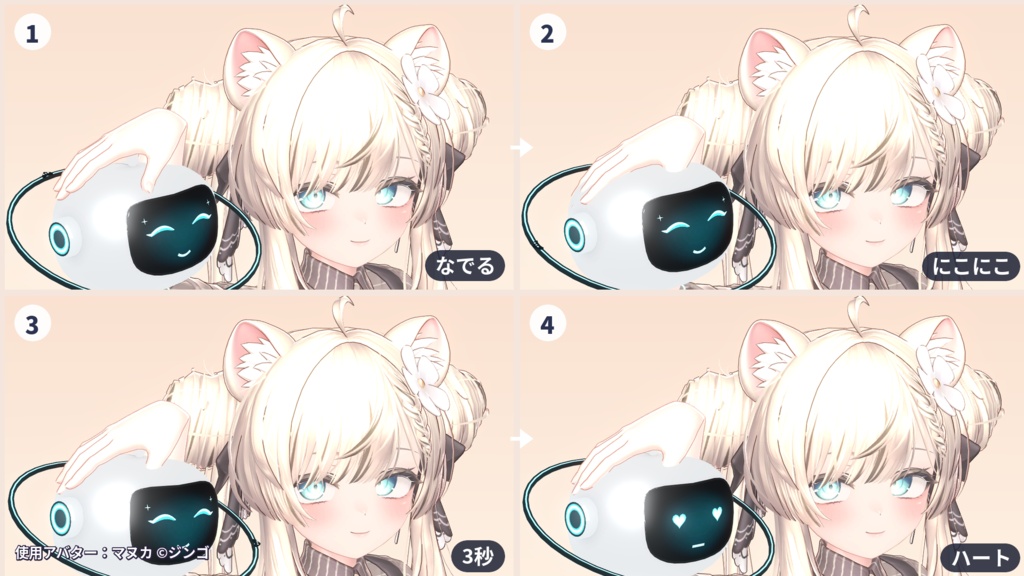
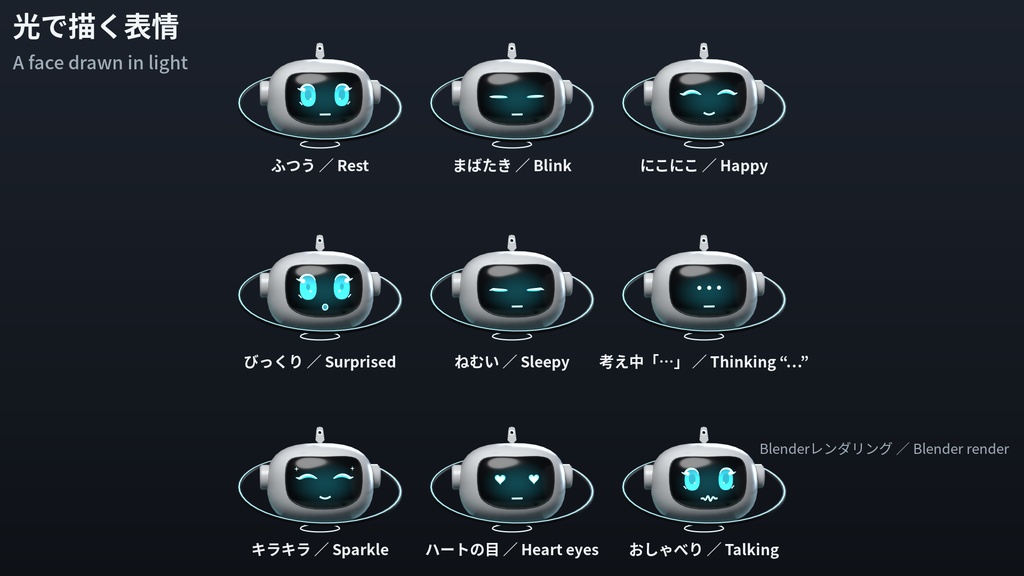
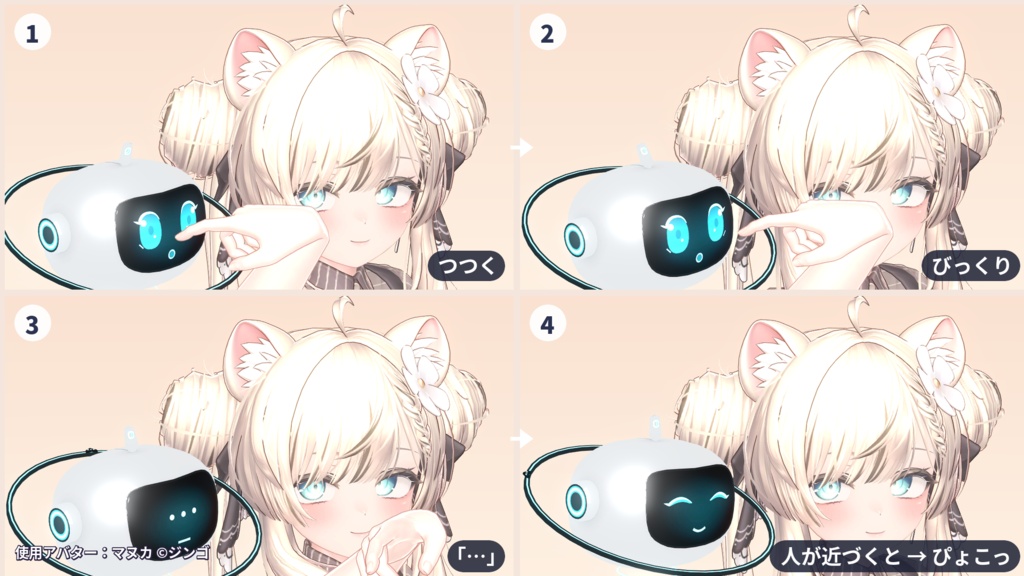
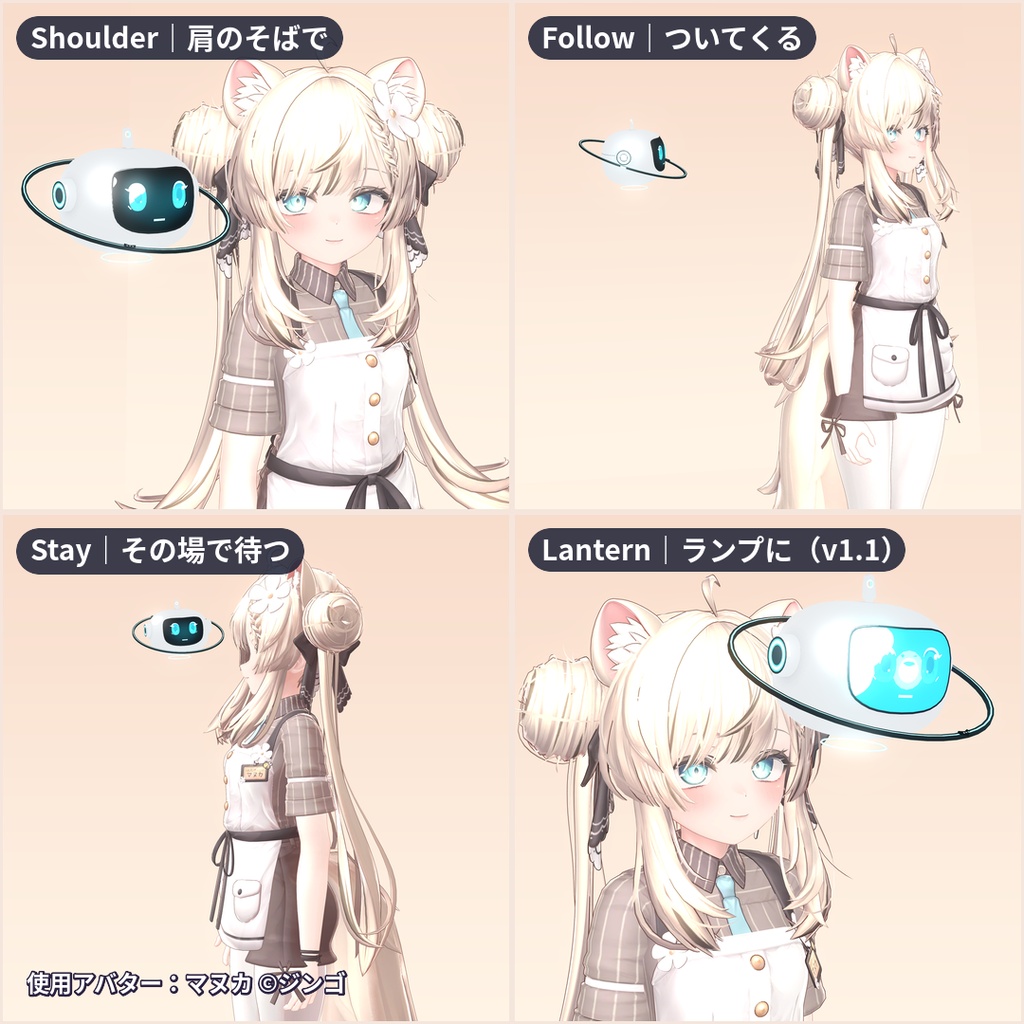
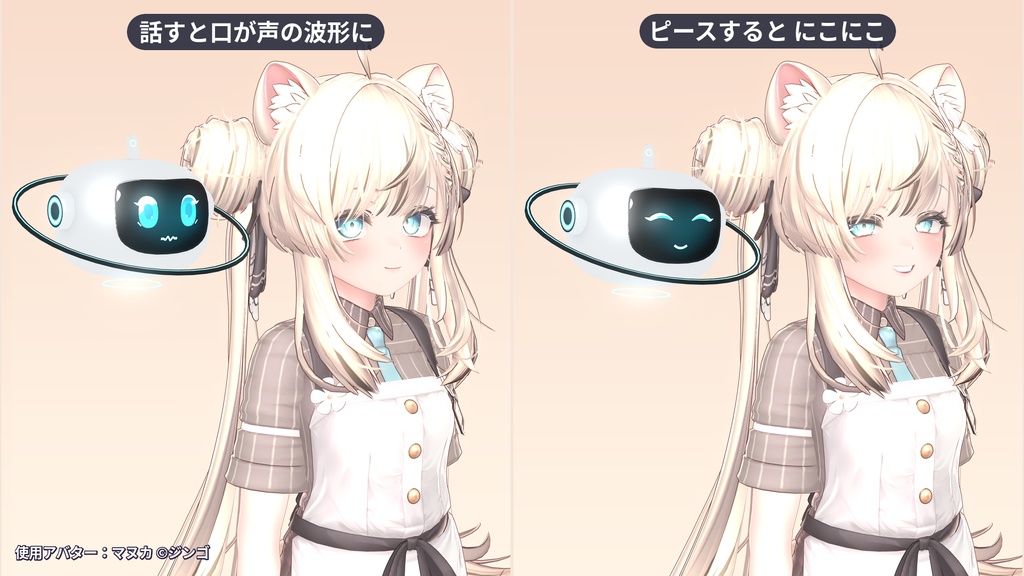
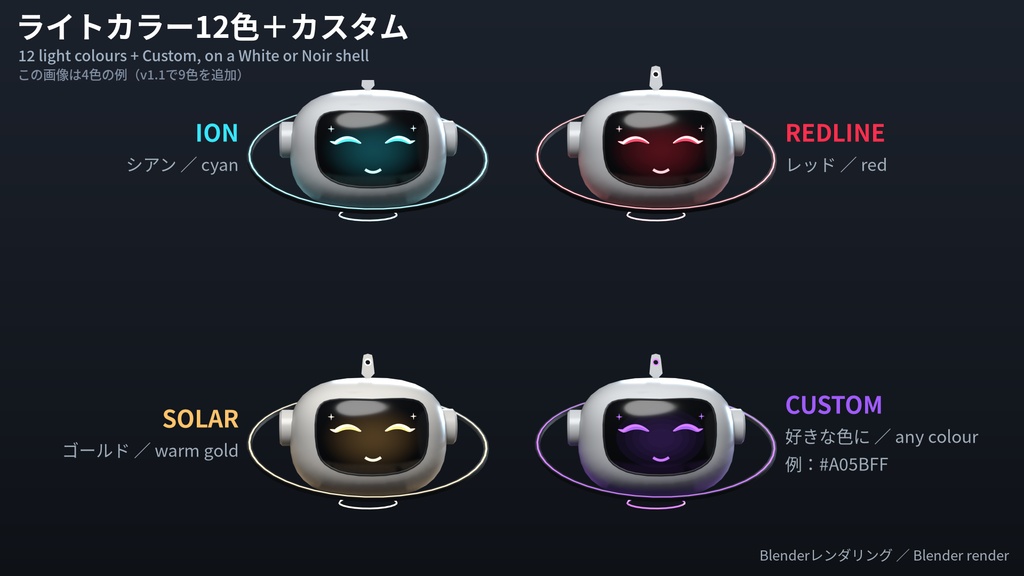
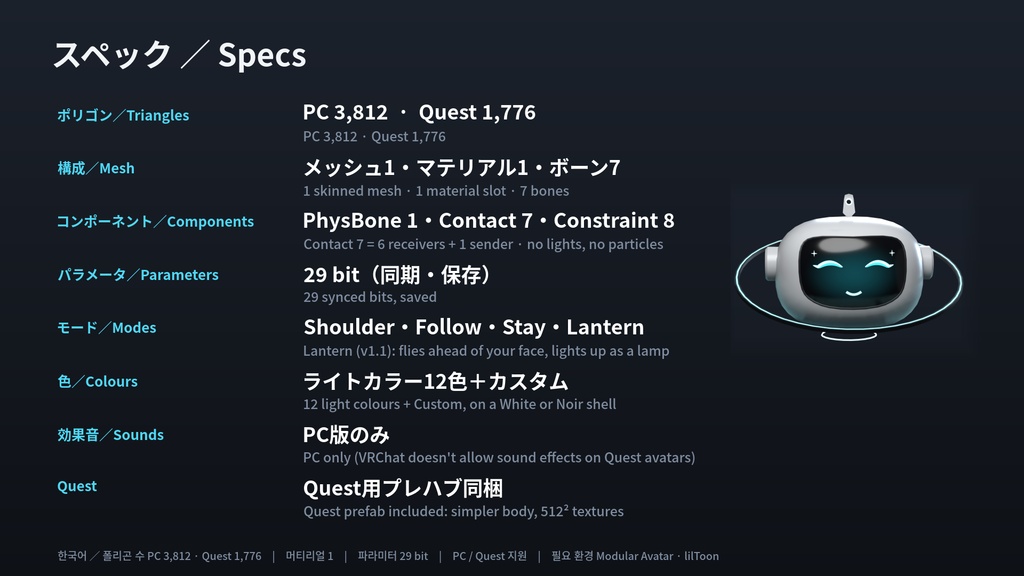
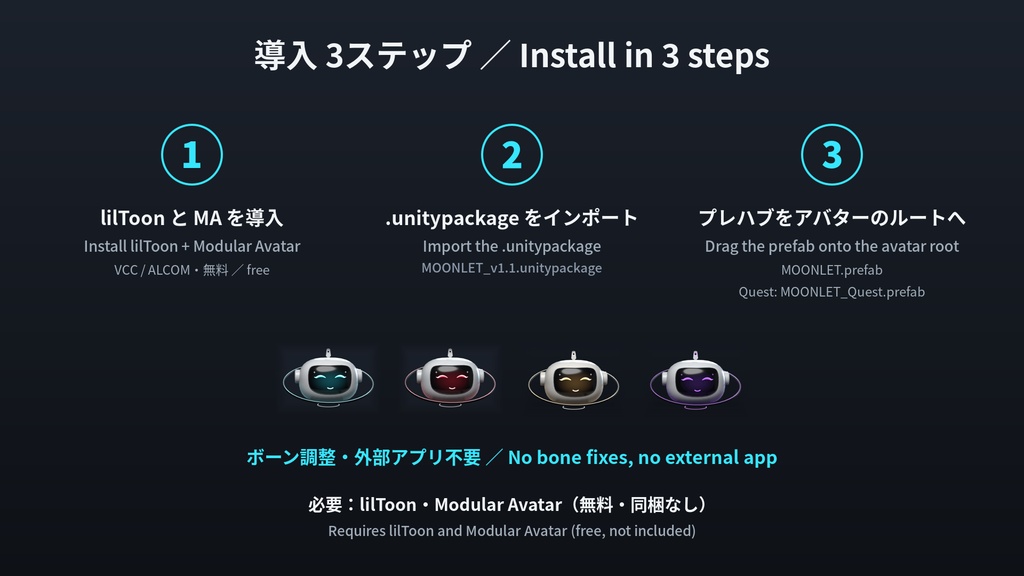
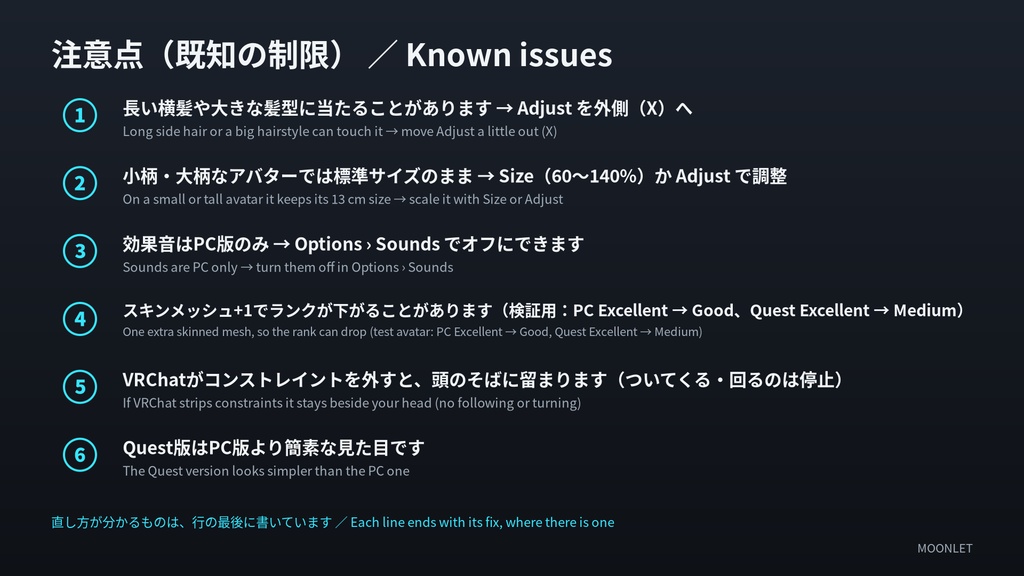
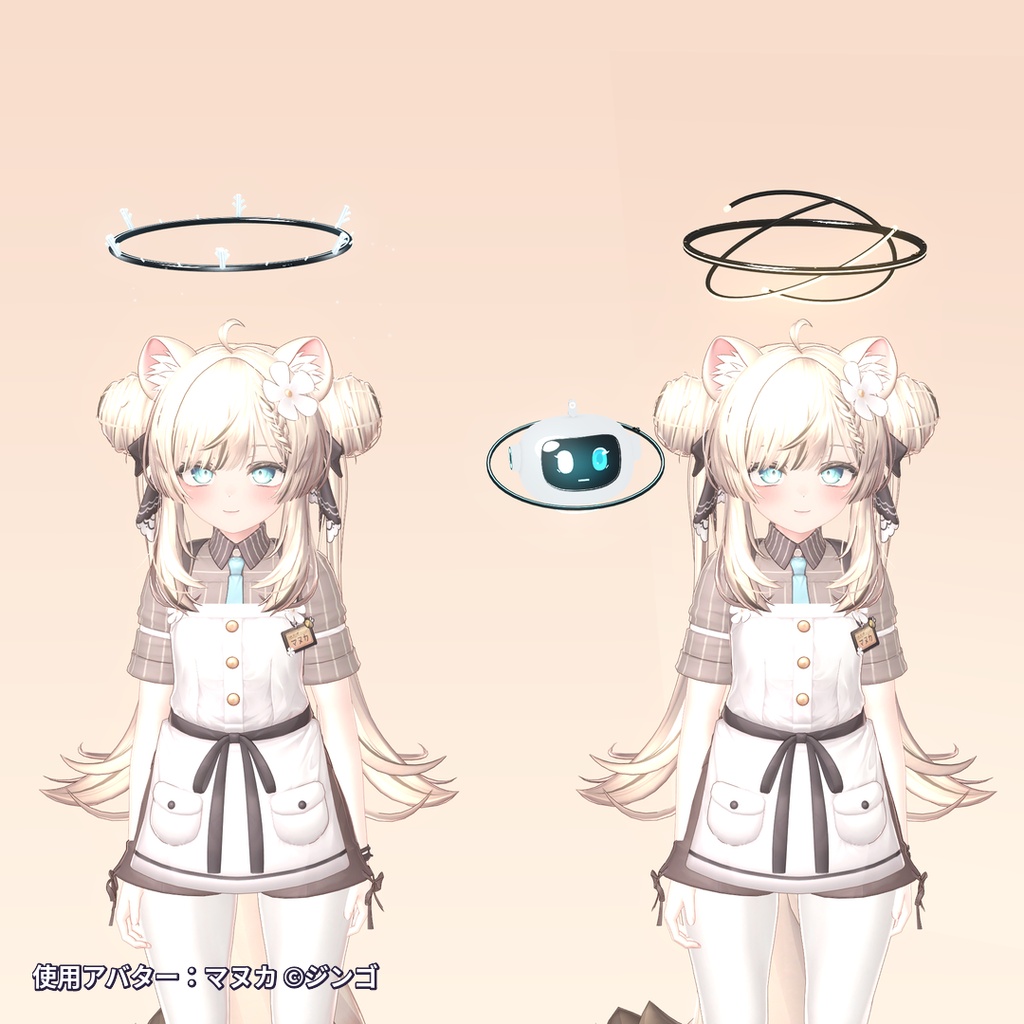
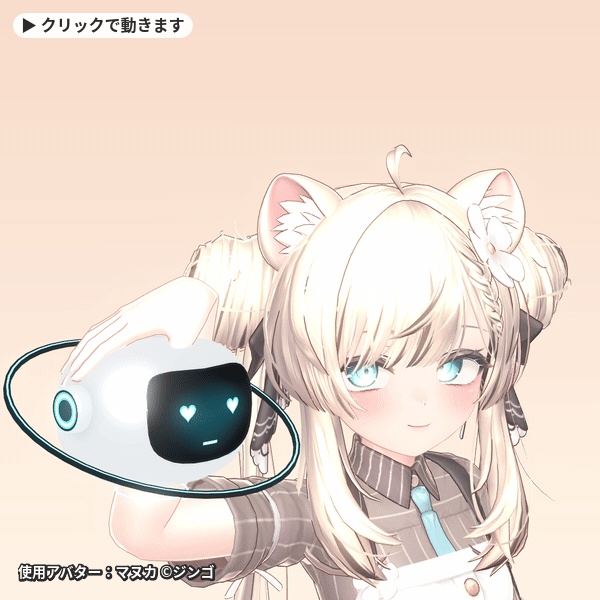
なでられるのが大好きな、小さな月のドローン。 肩のそばでふわふわ浮かんで、なでるとにこにこ。3秒なで続けるとハートの目に。つつくとびっくりして、人が来るとぴょこっとあいさつします。 新作・無料配布のお知らせは、ショップのフォローとX(https://x.com/viperrassets)でどうぞ。 ・ドラッグ&ドロップで導入(Modular Avatar対応・全アバター対応) ・PC/Quest対応 ・4つのモード(Shoulder/Follow/Stay/Lantern)、話すと口が声の波形に、ハンドジェスチャーで表情が変わる 【v1.1 無料アップデート(2026-11-01)】 購入済みの方は、追加料金なしで最新版(MOONLET_v1.1.zip)をダウンロードできます。ダウンロードファイルは MOONLET_v1.1.zip をおすすめします(v1.0のファイルも残してあります。v1.1は v1.0 の内容をすべて含みます)。 ・ライトカラーが3色+カスタムから12色+カスタムに:VIOLET/WHITE/FROST/HOLLY/SAKURA/MINT/AMBER/ULTRAMARINE/LILAC を追加 ・Noirシェル:ボディをダークグレーに切り替え。ライトカラー12色+カスタム、ホワイト/ノワールの2シェル ・ランタンモード:顔の前に飛んで、ディスプレイがランプのように光ります(本物のライトではなく、光の円錐もありません) ・Stayモードのごくわずかなズレ(1分あたり約0.4 mm)を修正 ・コンタクト 4→7(Receiver 6・Sender 1)、同期パラメーター 28→29 bit(Noirを追加) ・アップデート:v1.0の上にインポートするだけです。置いた位置(Adjust)と初期値はそのまま残ります ・Customの色を自分で変えている方:インポート画面で MAT_Moonlet_Custom_lil と MAT_Moonlet_Custom_Quest のチェックを外してください(同梱は例の紫のままです) ・Customのランタン:ランプはCustomの色に従います(外側のリングは少し暗い同系色)。明るくしたい場合はCustomマテリアルのEmission強度を上げてください(本体の発光も明るくなります) ・Quest版のランタンはPC版より暗めです。Questのランクは Medium のまま、Contactの項目だけ Good → Medium になります MOONLET(ムーンレット)は、手のひらサイズの「小さな月」の測量ドローン。 白いセラミックのまるいボディに、傾いた軌道リングと、光で描くアニメ調の顔。 肩のそばに浮かんだり、あなたのあとをついてきたり、置いた場所で待っていたりします。 ■ 光で描く表情 にこにこ・キラキラ・びっくり・考え中「…」・ハートの目・ねむい。 まばたきや視線の移動は自動です。 ■ なでる・つつく・あいさつ ・なでると、にこにこ+キラキラ。3秒なで続けるとハートの目に ・顔の画面をつつくと、びっくり → 「…」 ・ほかのプレイヤーが近づくと、ぴょこっとあいさつ ・アンテナはPhysBoneでゆれます リアクションは、まわりのプレイヤーにも同じように見えます。 ■ 4つのモード ・Shoulder:肩のそばでふわふわ(標準) ・Follow:少しうしろをついてくる。離れすぎるとワープして追いつきます ・Stay:その場で待機。しばらくすると居眠りして、戻ると起きて喜びます ・Lantern:顔の前に飛んで、ディスプレイがランプのように光ります ■ ほかにも ・話すと、口が声の波形に(Voice wave) ・ハンドジェスチャーに合わせて、表情が変わります(Mirror) ・オリジナルの効果音(PC版のみ) ・左右の位置、サイズ(60〜140%)、ライトカラー12色+カスタム(ION/REDLINE/SOLAR/VIOLET…LILAC)、ホワイト/ノワールの2シェル ■ MA対応・全アバター対応 プレハブをアバターのルートにドラッグするだけ。ボーンの調整や外部アプリは不要です。 VRChatのアバタースケーリングにも追従します。 長い横髪や大きな髪型に当たる場合は、Adjustオブジェクトを少し外へ動かしてください(READMEに手順があります)。 ■ PC/Quest対応 Quest用プレハブを同梱しています。 効果音はPC版のみ(QuestではVRChatの仕様で、アバターに効果音を入れられません)。 ■ スペック ・ポリゴン数:PC 3,812/Quest 1,776 ・マテリアル / テクスチャ:マテリアル1(スロット1)/テクスチャ PC 1.67 MB・Quest 0.45 MB(Questは512²以下) ・PhysBone:1(アンテナ) ・そのほか:コンタクト7(Receiver 6・Sender 1)・コンストレイント8・ボーン7・Audio Source 1(PCのみ)。ライト・パーティクルなし ・パラメータ:29 bit(同期・保存) ・パフォーマンス:スキンメッシュを1つ足します。最小構成の検証用アバターでは、PCは Excellent → Good、Quest は Excellent → Medium になりました。ランクはアバター全体で決まります ・PC / Quest対応:PC用・Quest用プレハブを同梱(効果音はPC版のみ) ・必要なもの:VRChat Avatars SDK 3.10.5、Modular Avatar 1.18.7、lilToon 2.4.1(検証したバージョン。Unity 2022.3.22f1) ・動作確認アバター:当ショップの人型の検証用アバター(身長1.66 m、スケール0.5倍・2倍を含む) ・Write Defaults:MOONLET自身のステートはOff。Modular Avatarがアバター側の設定に合わせます ■ 스펙 (KR) MOONLET은 어깨 옆에 떠서 따라다니는 작은 드론입니다. 얼굴 표정이 바뀌고, 쓰다듬거나 건드리면 반응합니다. Modular Avatar로 아바타에 드래그만 하면 됩니다 (PC / Quest). ・폴리곤 수: PC 3,812 / Quest 1,776 ・머티리얼 / 텍스처: 머티리얼 1 / 텍스처 PC 1.67 MB, Quest 0.45 MB ・PhysBone: 1 (안테나) ・파라미터: 29 bit (동기화·저장) ・퍼포먼스: 스킨 메시를 1개 추가합니다. 최소 구성 테스트 아바타에서 PC는 Excellent → Good, Quest는 Excellent → Medium이었습니다 ・PC / Quest 지원: PC용·Quest용 프리팹 포함 (효과음은 PC 전용) ・필요 환경: VRChat Avatars SDK 3.10.5, Modular Avatar 1.18.7, lilToon 2.4.1 ・동작 확인 아바타: 자체 테스트 아바타 ・Write Defaults: 아바타 설정에 맞춤 (Modular Avatar) ■ 導入は3ステップ 1. lilToon と Modular Avatar を導入 2. .unitypackage をインポート 3. MOONLET(PC)または MOONLET_Quest をアバターのルートにドラッグしてアップロード ■ 注意点(既知の制限) ・長い横髪や大きな髪型・ヘッドギアに、Shoulderモードで当たることがあります → Adjustオブジェクトを少し外側(X)へ動かしてください ・小柄・大柄にモデリングされたアバター(VRChat側でスケールしていない場合)では、MOONLETは標準サイズ(13 cm)のままです → Size(60〜140%)か Adjust で調整できます ・効果音はPC版のみです(QuestではVRChatの仕様で、アバターに効果音を入れられません)→ PC版は、メニューの Options › Sounds でオフにできます ・スキンメッシュを1つ足すため、アバターのパフォーマンスランクが下がることがあります(最小構成の検証用アバターで、PCは Excellent → Good、Quest は Excellent → Medium)。ランクはアバター全体で決まります ・VRChatがコンストレイントを外した場合(アバターが制限を超えたときなど)、MOONLETは頭のそばに留まりますが、ついてくる・回る動きはしなくなります ・Quest版はPC版より簡素な見た目です(1,776ポリゴン、512²以下のテクスチャ) ■ 必要なもの(無料・同梱なし) ・lilToon:https://booth.pm/ja/items/3087170 ・Modular Avatar:https://modular-avatar.nadena.dev/ja/docs/intro ▼同じショップ SF光輪パック GLORIOLE.SYS(単品/6種セット):https://viperrassets.booth.pm/items/9063346 GLORIOLE.SYS LITE(SIGNAL・ION の1種/無料):https://viperrassets.booth.pm/items/9064997 写真を投稿するときは #ViperrAssets と #MOONLET をつけてください。リポストします! English description below. ※アバターは付属しません。 ※使用アバター(画像のみ):オリジナル3Dモデル『マヌカ』 ©ジンゴ 本商品にマヌカのデータは含まれません。 ※画像はUnity(lilToon)での撮影です(「Blender render」と表記した画像を除く)。VRChat内での見え方は、ワールドの光やエフェクトによって変わります。 Shown on Manuka (©JINGO), in images only; Manuka is not included. Images are Unity (lilToon) captures unless marked "Blender render". ※デジタル商品です。説明どおりに動作しない場合は、BOOTHのメッセージからご連絡ください。修正、または導入のお手伝いをします。
English
Personality: a little moon drone that loves being petted. It floats at your shoulder and smiles when you pat it, gets heart eyes after three seconds, jumps when you boop it, and pops up to greet players who walk up. Follow the shop for new releases and free items: https://x.com/viperrassets [v1.1 free update (2026-11-01)] Existing buyers can download the latest file (MOONLET_v1.1.zip) at no extra cost. MOONLET_v1.1.zip is the recommended file; the v1.0 file stays beside it (v1.1 contains everything in v1.0). - Light colours: 3 + Custom → 12 + Custom (new: VIOLET, WHITE, FROST, HOLLY, SAKURA, MINT, AMBER, ULTRAMARINE, LILAC) - Noir shell: turns the body dark grey on any colour. 12 light colours + Custom, on a White or Noir shell - Lantern mode: MOONLET flies ahead of your face and its display lights up as a lamp (a glowing display, not a real light; no light cone) - Stay mode: a tiny slow drift (about 0.4 mm a minute) is fixed - Contacts 4 → 7 (6 receivers, 1 sender); synced parameters 28 → 29 bits (Noir added) - Upgrade: import over v1.0. Your placement (Adjust) and defaults are kept - If you set your own Custom colour: untick MAT_Moonlet_Custom_lil and MAT_Moonlet_Custom_Quest in the import window (the package ships the violet example) - Custom + Lantern: the lamp follows your Custom colour (its outer ring is a dimmer shade). For a brighter lamp, raise the Custom material's emission intensity (this also brightens the body glow) - On Quest the Lantern lamp is dimmer than on PC. Quest's rank stays Medium; only the contacts category goes Good → Medium MOONLET is a palm-sized survey drone: a little white moon with its own tilted orbit ring and an anime face drawn in light. It floats at your shoulder, follows you through the world, or waits where you leave it. It reacts when people pat it, boop it, or come over to say hi. A face that reacts - Eyes and mouth drawn in light: happy, sparkly, surprised, thinking "...", heart eyes, sleepy. It blinks and glances around on its own. - Pat it: happy and sparkly. Keep patting for 3 seconds and it gets heart eyes. - Boop the screen: surprised, then "...". - Friends nearby: a little greeting hop when another player comes close. - The antenna wobbles with PhysBones. Everyone around you sees the same reactions. Four modes - Shoulder (default): hovers beside your head with a gentle bob. - Follow: trails behind you through the world and catches up after teleports. - Stay: waits where you leave it, dozes off after a minute, and wakes up happy when you come back. - Lantern: floats ahead of your face; its display lights up as a lamp. More - Voice wave: its mouth becomes a waveform when you talk. - Mirror: copies the expression of your hand gestures. - Original sound chirps (PC only). - Menu: mode, left / right side, size (60-140 %), 12 light colours + Custom (ION, REDLINE, SOLAR + 9 new), on a White or Noir shell. Modular Avatar, any avatar: drag one prefab onto your avatar's root. No bone fixes, no T- or A-pose adjustments, no external app. It scales with VRChat avatar scaling. It's anchored to your chest, never your head, so it doesn't vanish in first person. Long side hair or a big hairstyle in the way? Move the Adjust object a little outward (the README shows how). PC + Quest: a Quest prefab is included. Sounds: PC only (VRChat doesn't allow sound effects on Quest avatars). Light: 1 mesh, 1 material, 3,812 triangles (1,776 on Quest), no lights or particles, 29 bits of synced parameters.
English: specs, setup, known issues
Specs - Triangles: PC 3,812 · Quest 1,776 - Materials / textures: 1 material slot; textures PC 1.67 MB · Quest 0.45 MB (Quest at 512² or smaller) - PhysBones: 1 (the antenna) - Other: 7 contacts (6 receivers, 1 sender), 8 constraints, 7 bones, 1 audio source (PC only). No lights, no particles - Parameter bits: 29 (synced, saved) - Performance: adds one skinned mesh. On a minimal test avatar, PC went Excellent → Good and Quest went Excellent → Medium. The rank depends on the whole avatar - PC / Quest: PC and Quest prefabs included (sounds: PC only) - Requirements: VRChat Avatars SDK 3.10.5, Modular Avatar 1.18.7, lilToon 2.4.1 (the versions we tested, with Unity 2022.3.22f1) - Tested on: our own humanoid test avatars (a 1.66 m body, including scale 0.5× and 2×) - Write Defaults: MOONLET's own states use Write Defaults Off; Modular Avatar matches your avatar's setting Setup in 3 steps 1. Install lilToon and Modular Avatar. 2. Import the .unitypackage. 3. Drag MOONLET (PC) or MOONLET_Quest onto your avatar's root and upload. Known issues - Long side hair, big hairstyles or headgear can touch it in Shoulder mode → move the Adjust object a little further out (X). - On an avatar modelled small or tall (not scaled in VRChat), MOONLET keeps its normal 13 cm size → scale it with Size (60–140 %) or the Adjust object. - Sounds are PC only (VRChat doesn't allow sound effects on Quest avatars) → on PC, turn them off in Options › Sounds. - It adds one skinned mesh, so your avatar's rank can drop (on a minimal test avatar: PC Excellent → Good, Quest Excellent → Medium). The rank depends on the whole avatar. - If VRChat strips constraints (for example when an avatar goes over a limit), MOONLET stays beside your head but stops following and turning. - The Quest version looks simpler than the PC one (1,776 triangles, textures at 512² or smaller). Requires (free, not included): lilToon and Modular Avatar. Avatar not included; Manuka (©JINGO) appears in the images only. Images are Unity (lilToon) captures unless marked "Blender render". How it looks in VRChat varies with the world's lighting and effects; the Quest version is simpler still. 100% original: modeled, textured and sound-designed from scratch by Viperr Assets with our own scripts. It matches our GLORIOLE.SYS halos: https://viperrassets.booth.pm/items/9063346 Free LITE version of GLORIOLE.SYS: https://viperrassets.booth.pm/items/9064997 License: our own license. Personal and commercial use on avatars, worlds and content is OK, and so is modifying the files. Redistributing or reselling the files, raw or modified (including inside free avatar packs), is not OK. Neither is using them for AI training or claiming them as your own. Credit is appreciated but not required. The full text is in the LICENSE file in the download. Digital download. If anything doesn't work as described, message us and we will fix it or help you set it up. X: @viperrassets (https://x.com/viperrassets) Post your photos with #ViperrAssets and #MOONLET: we repost them!
利用規約 / Terms of Use
当ショップ独自の利用規約です。 ・OK:アバター・ワールド・コンテンツでの個人利用・商用利用、改変 ・NG:ファイルの再配布・転売(無改変・改変後を問わず。無料アバターパック等への同梱も含む)、AI学習への利用、自作と偽ること ・クレジット表記:任意(あると嬉しいです) 全文は同梱の LICENSE.md をご覧ください。 Our own terms. Personal and commercial use on avatars, worlds and content is OK, and so is modifying the files. Redistributing or reselling the files (raw or modified, including inside free avatar packs), AI training, and claiming them as your own are not. Credit is appreciated but not required. Full text: LICENSE.md.
更新履歴 / Update history
v1.1 無料アップデート(2026-11-01):ライトカラー12色+カスタム、Noirシェル、ランタンモード / Free update: 12 light colours + Custom, Noir shell, Lantern mode v1.0 初版公開 / First release
内容物 / Contents
・Unity:MOONLET_v1.1.unitypackage(161アセット) PC用プレハブ(MOONLET)、Quest用プレハブ(MOONLET_Quest)、lilToonマテリアル(PC)、Quest用マテリアル、効果音4種(PC用)、メニューアイコン、インポート設定済みのFBX・テクスチャ(カスタム色用のニュートラルテクスチャ含む) ・README_JA.md / README_EN.md(導入手順)、LICENSE.md ※ lilToon と Modular Avatar(どちらも無料)は同梱していません。 Contents: MOONLET_v1.1.unitypackage (161 assets: PC prefab, Quest prefab, lilToon materials for PC, Quest materials, 4 sound chirps for PC, menu icons, FBX and textures with import settings set, including the neutral texture for the Custom colour) · README_EN.md / README_JA.md (install guide) · LICENSE.md. lilToon and Modular Avatar (both free) are not included.
対応環境・パフォーマンス / Compatibility
・VRChat(PC / Quest):Humanoidのアバターならどれでも(ドラッグ&ドロップのみ) ・検証環境:Unity 2022.3.22f1、VRChat Avatars SDK 3.10.5、Modular Avatar 1.18.7、lilToon 2.4.1 ・PC:3,812ポリゴン・1メッシュ・1マテリアル・ボーン7本・PhysBone 1・Contact 7(Receiver 6・Sender 1)・Constraint 8・Audio Source 1・テクスチャ1.67 MB ・Quest:1,776ポリゴン・1メッシュ・1マテリアル・Audio Sourceなし・テクスチャ0.45 MB ・同期パラメーター:29 bit ・ライト・パーティクルは使っていません ・頭のボーンには付けないので、一人称視点でも消えません ・パフォーマンスランク:スキンメッシュを1つ足します。最小構成の検証用アバターでは、PCは Excellent → Good、Quest は Excellent → Medium になりました。ランクはアバター全体で決まります Compatibility: VRChat (PC / Quest), any Humanoid avatar, drag and drop only. Tested with Unity 2022.3.22f1, SDK 3.10.5, Modular Avatar 1.18.7, lilToon 2.4.1. PC: 3,812 tris, 1 mesh, 1 material, 7 bones, 1 PhysBone, 7 contacts (6 receivers, 1 sender), 8 constraints, 1 audio source, 1.67 MB of textures. Quest: 1,776 tris, 1 mesh, 1 material, no audio, 0.45 MB of textures. 29 bits of synced parameters. No lights or particles. Rank: It adds one skinned mesh. On a minimal test avatar, PC went Excellent → Good and Quest went Excellent → Medium. Your avatar's rank depends on the whole avatar.